
library has changed quite a bit since our last update.
The biggest change is a new way of thinking about your library.
librarydojo is now focused on helping you answer a few practical questions:
- What can I trust?
- What still needs work?
- What have I forgotten about?
- What do I need to review?
Introducing Library Lenses
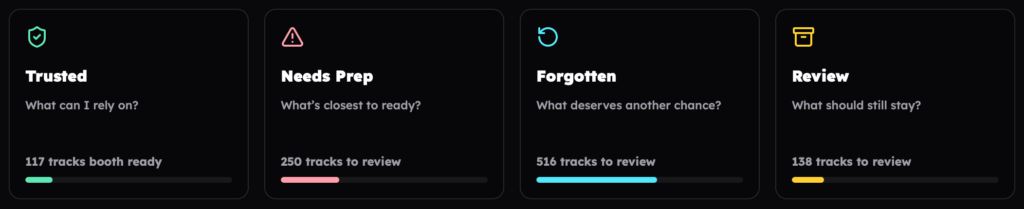
Your library is now organised into four Lenses, each designed around a different decision.
Trusted
The tracks that meet your Ready Standard and have the strongest evidence that you can rely on them.
Think of this as the dependable core of your library.
Needs Prep
Tracks that don’t yet meet your Ready Standard.
librarydojo helps you see what is holding them back so you can focus your prep where it will make the biggest difference.
Forgotten
Tracks that are prepared, but may have been forgotten about.
This is a place to rediscover music you’ve already put the work into rather than always reaching for something new.
Review
Older tracks with little evidence that they belong in your working library.
Review helps you decide whether they deserve another chance, need some work, or can finally make way for something better.
Sensei Recommendations
Lenses don’t just show you problems. They now suggest practical things you can do about them.
Depending on your library, you might be prompted to:
- Review duplicate tracks
- replace or remove low-quality files
- fix missing technical information
- revisit one-play tracks
- rediscover forgotten tags
- clean up messy tagging patterns
- finish preparation work that is holding tracks back
Recommendations are based on what librarydojo can actually see in your library, with the most useful next action brought to the front.
Better Focus Reviews
Finding a problem was never the hard part.
Actually fixing hundreds or thousands of tracks is.
Focus Reviews turn library work into smaller, manageable batches:
choose a task → export a batch → make the changes in Rekordbox → upload your latest XML → see what improved
After you re-upload, librarydojo checks the tracks from that review again and shows you what changed.
So instead of simply telling you that you have work to do, librarydojo can now help you do it and verify the result.
See the progress you’ve actually made
Supported Focus Reviews can now contribute to your Library Progress.
When librarydojo verifies improvements after a fresh XML upload, those changes are added to your progress total.
You can see:
- your verified library improvements
- the progress made in your latest Focus Review
- your current progress streak
- your longest streak
The goal isn’t to reward opening the app every day.
It’s to make the work you’re putting into your library visible.
A new My Library
The old Snapshot experience has been replaced by a simpler library overview built around the way you actually prep.
My Library now gives you a clearer starting point for your library, including your Lenses and verified progress.
Gig prep is still here
The Gig workspace introduced in our last update remains your dedicated space for preparing an upcoming set.
You can build and reorder your playlist, check track readiness, keep an eye on set length, spot issues, get suggestions and export the finished playlist.
The difference is that gig preparation now sits alongside the same broader philosophy as the rest of librarydojo: identify what needs attention, focus on the tracks that matter, make the changes in Rekordbox and bring the result back.
Lots of smaller improvements
There have been plenty of quality-of-life changes along the way too.
- Track lists are more compact, making it easier to scan through larger groups of music.
- Playlist exports have been improved for Windows libraries.
- Rekordbox’s Grouping field is now labelled Color (Grouping) throughout librarydojo, making it clearer what the setting refers to.
- The Profile page has been redesigned, with clearer information.
- Login and licence screens have also been refreshed, with clearer guidance when something goes wrong and easier routes to manage your subscription or licence.
Keep building a library you can trust
Upload your latest rekordbox XML and take a look at your Lenses.
You might be surprised by what’s ready, what’s nearly there, and what you’ve completely forgotten about.